Showing posts with label IT. Show all posts

Wednesday, December 21, 2011

Prep for Facebook's Timeline Layout: 6 Must-Do Privacy Tweaks

Get ready for your Facebook past to come back with a vengeance; the social network is now rolling out its new profile layout, Timeline, to all users worldwide. Timeline is basically an online scrapbook that displays your Facebook activity in reverse chronological order going back to when you first joined the social network.

You can hide the embarrassing bits of your Facebook life before your new profile goes live, the good news is you can! Here are 6 steps to follow to safeguard yourself:

Get Timeline. There are three ways Timeline could arrive on your profile....

Hide Old Posts. If you want to get rid of an old status update, photo, article link or like, go to the post on Timeline and hover over its top right corner. Click the pencil icon and select "Hide from Timeline...."

Check the Log. If you want to keep a post on your Timeline, but don't want specific people to see it you can change an individual post's settings using your Activity Log....

Feature Old Posts. If you have a post you'd like to feature, such as a photo of a wedding or graduation, hover over the top right corner of the post again....

Set your cover photo. The top of your profile will now include a large photo called the cover photo that will be one of the first things people landing on your profile will see....

View as Public. After you've edited your Timeline, you may want to check what others will be able to see on your revamped profile....

Marko comments: Timeline will be mandatory for all Facebook users, that's what they're giving us!

(for the complete post see Ian Paul, Prep for Facebook's Timeline Layout: 6 Must-Do Privacy Tweaks, PCWorld, December 16, 2011)

Saturday, March 26, 2011

How to unbrick a PSP (Huh? what does that mean...)

Recently I bought my son a used Sony PSP 2000 for $50 from a friend as a birthday present. The next day he went to Gamestop, tried out Rapala Pro Bass Fishing, and the PSP stopped working. He brought it home to yours truly, a 50-something IT expert.

I know nothing about PSPs. Four hours of hard work, and this is what I figured out. The PSP was fully bricked!!!!

Huh? The verb "to brick" was not in my vocabulary two days ago. What does it mean, you ask? "When used in reference to consumer electronics, 'brick' describes a device that cannot function in any capacity (such as a device with damaged firmware). This usage derives from the fact that some electronic devices (and their detachable power supplies) are vaguely brick-shaped, and so those which do not function are useful only as actual bricks." This is according to Wikipedia.

(To receive new uMarko posts via a daily email, please click Subscribe)
(On Twitter: FOLLOW uMarko or http://www.twitter.com/uMarko)


What happened? What did we do wrong? Well, looking back in hindsight, what we should have done first with the used PSP (or any such game device) was to update the firmware to the latest version. For a PSP, the instructions for doing this are at the Sony website here. (It wasn't easy to find the instructions, and they aren't so simple to follow, but that is another topic.)

Since we didn't know to do this ... when the Gamestop employee gave my son the Rapala Pro Bass Fishing game to try out, she should have asked whether his PSP firmware was up to date (of course she didn't). My son should have known not too, but he inserted the UMD disk for Rapala Pro Bass Fishing at Gamestop to try it out, it detected that the firmware on the PSP was an old version, 3.50. It said that it needed to upgrade to 4.0 or higher. I don't know if my son clicked OK (he should have known not too), or if it just went ahead and tried to do the upgrade. It tried looking for the upgrade on the memory card, on the UMD disk, and by way of connecting to the Internet (which wasn't enabled), and it couldn't find it. Meanwhile, it gave the helpful message:

 "Updating. Do not turn off the system, remove the memory stick or remove the ac adapter."

There was nothing he could do. He turned off the system. By doing so the PSP got bricked @$^& meaning that the boot firmware is corrupted and does not respond at all when you turn power on, so the display stays completely blank.

Enter the IT expert (me). After 2 hours I figured out what happened. I then figured out that 95% of PSP's (and other similar systems) can be unbricked!! There are dozens of youtube videos with suggestions how to do it, but the only method that really works is to shell out $32  and purchase a Pandora Battery and Magic Memory Stick. The PSP battery is not just a dumb battery, but has some electronics in it that somehow safeguards the firmware from being hacked. But when you are fully bricked you have to get around this anti-hack system. The Pandora Battery is a modified PSP battery that allows the system to boot from a memory stick instead of from the firmware. The Magic Memory Stick has custom code that downgrades your corrupted firmware to an older version. So when you go back to your old battery and memory stick and turn your PSP back on, the firmware will boot. This is called "unbricking" your system.

But I didn't want to pay $32 to see if this would actually work. So I tried the procedure in 3 or 4 of the more unusual youtube videos, I was downloading weird software onto my PC, trying to construct my own Magic Memory Stick, learned about how to open up your PSP battery and convert it into a homestyle Pandora Battery.

Two hours later, I finally figured out that we did not fit the 95% of users that could be unbricked. We were in the bad 5%!! The failed youtube videos plus another hour of google searches proved this - I figured out that part of that 5% are Piano Black PSP 2000 Slim with BARCODE starting with AB02. They cannot have custom firmware, because it has the TA88v3 motherboard. You cannot unbrick such a system. It is virtually hackproof. If you insist on trying to fix it, you will have to replace the motherboard, yeah, right!!

We're going to throw the PSP away, $50 down the tube. But this IT expert sure got an education....

Tuesday, March 22, 2011

.JPEG for compression? God's algorithm .BRAIN is far better

How can the brain transmit and process that much visual information? The answer is, apparently, it uses compression – just like computers compress raw camera photos into more manageable JPEG images. That’s the title of an article on Science Daily: “JPEG for the Mind: How the Brain Compresses Visual Information.” \

The .JPEG Compression Algorithm.

“Computers can beat us at math and chess,” said Ed Connor of Johns Hopkins, “but they can’t match our ability to distinguish, recognize, understand, remember, and manipulate the objects that make up our world. “This core human ability depends in part on condensing visual information to a tractable level. For now, at least, the .brain format seems to be the best compression algorithm around.

(excerpted from  "This Is Your Brain on Bytes", Creation-Evolution Headlines, February 2011)

(also published in Creation Matters, a publication of Creation Research Society, Volume 16, Number 1, January/February 2011, to appear at http://www.creationresearch.org/creation_matters/pdf/2010/CM15%2006%20low%20res.pdf)

(To receive new uMarko posts via a daily email, please click Subscribe)
(On Twitter: FOLLOW uMarko or http://www.twitter.com/uMarko)

Thursday, March 17, 2011

Best software/hardware podcast setup for serialized audio books

After a couple months of trial and tribulation, I have finally come up with the best podcast recording setup for serialized audio books. It's easy! Only eight steps to follow:

1) You must first make sure that your hardware is capable of streaming audio without dropouts. If you are using Windows, install DPC Latency Checker. Follow the guidelines on the Product Sheet for shutting off drivers that are causing unacceptable latency. Make sure you have your recording hardware, like your USB headset, plugged into the computer when you run the latency check. You will probably have to temporarily disable your wireless driver from Device Manager to get all green during the check. You may also have to stop your anti-virus service. Once you find the right combination of drivers to disable for acceptable latency, you will have to disable them each time you make record an episode from your book.

2) I found that my Dell Latitude E6500 laptop failed the latency checker even if I disabled all possible drivers and stopped all possible services. If your hardware does not pass muster, you may need to purchase a different computer. It is almost an impossible to buy a computer, sight unseen, that will have adequate latency. However, NoteBookCheck is a fantastic site that reviews laptops and netbooks, and includes stats from DPC Latency Checker for each one. If you want to track down an acceptable netbook, go to Google and search on this combination:
    netbook dpc latency site:http://www.notebookcheck.net/

3) The best recording software for Windows is Audacity. Limit your recording to less than 45 minutes per episode, usually one episode for each single chapter of the book that you are recording. After you record your voice track, export to a .wav file.

 4) Install CN Levelator. Levelator adjusts the audio levels within your podcast or other audio file for variations from one speaker to the next, for example. Run Levelator, then drag and drop your .wav file onto the Levelator window for automatic processing. Levelator will create an output .wav file.

Rick
5) Then import the .wav file created by Levelator back into Audacity, and mix in separate intro and outro music tracks. A great source for royalty-free music .mp3 files for your podcast intros and outros is Rick’s FREE Royalty-free Music Download Page.

6) From Audacity, export your podcast with the intro and outro to an .mp3 file. Make sure you tag it according to Podiocast's ID3 tagging convention, as given at the Authors Guidelines link which can be accessed from the Podiobook Authors page.

7) Upload your finished .mp3 to a file sharing site. I use Divshare. You will be staging your files there for ultimate delivery to Podiobooks.

Podiobooks.com
8) The best site for distributing your serialized audio book is Podiobooks. The term podiobook was coined by Evo Terra to describe serialized audiobooks which are distributed via RSS, much like a podcast. Listeners to Podiobooks.com can choose to receive the episodes of their books via an RSS feed or by listening to episodes by directly downloading episodes from the Podibooks site. Some listeners keep the audio files on their computers, some transfer the book to CD, but most transfer the file on to their MP3 player so they can listen no matter where they are. See the Podibooks FAQ.

Look for my first podiobook series sometime in 2011!

Marko

Friday, January 07, 2011

Nations Clamping Down on Internet Freedom

Scott Bradner comments that Internet Freedom is under attack by nations around the world, in his article Goodbye Internet, we hardly knew ye?

"Throughout its history, the Internet, in most places, has been essentially free from government regulation. There are significant exceptions -- a few countries do quite an effective job of controlling Internet content and a number of countries control specific Internet technologies such as encryption and VoIP. But, on the whole, the Internet has been left alone.

"Governments, in general, do not much like the Internet, or at least the Internet-based activities that they do not control. Some governments, such as China, have established strong controls over the Internet in their own countries. Venezuela has just proposed to do the same.

"Restructuring the Internet so that each country has a control point could easily wipe out the ability of Internet users to find out what is going on in the world.

"But we do not have to wait until the UN acts to see the future. The U.S. government recently seized a bunch of domain names without letting the owners contest the seizure.

"News reports show that the U.S. government pressured PayPal and Amazon to stop supporting WikiLeaks, again without any due process. You do not have to be a fan of WikiLeaks to understand that letting the U.S. government decide, on its own, without the legal process defined in our Constitution, what should and what should not be accessible on the Internet is not a recipe for freedom. Maybe they can take pointers from China."

(for more, see Goodbye Internet, we hardly knew ye?, by Scott Bradner)

(Also see 10 Ways the Chinese Internet is Different From Yours)

Facebook is Big Brother, not Google

"Here is what Ryan Singel says in a deep-dive post that gets to the meat of why Facebook scares Google so much.

Singel argued "it's because Facebook with its Like Button and other social plug-ins, has found "a way of placing ads anywhere on the Net with a granularity Google can only dream of -- in no small part because Google promised its users never to go down that path." Singel added:


"One, there's so much interaction and information being shared inside Facebook that it has become a decent-sized replica of the Web inside the Web. And Google can't crawl and analyze much of what happens in there. That's a problem when your goal is to organize the world's information. Google is blind to this because much of what happens on Facebook remains in Facebook. ... The problem is that Google built a wall between user search data and advertising -- and the mammoth financial success of AdWords proved that the separation was fine at the time.

"Two, Facebook knows who you are and has the right to use that information because you explicitly gave it to them. Google has different kinds of data that reveal a lot about who you are and what you are interested in -- some of it very private. But very little of that data is information you explicitly told the company to share, and they've assiduously promised not to use your search history and e-mail data to profile of you."

(For more, see Why Facebook Has Google over a Barrel: Social Ads, by Clint Boulton, 11/15/2010)

Saturday, December 11, 2010

Actions YOU *must* take to protect your Facebook password

Use https://www.facebook.com, not http://www.facebook.com!! Or you can be easily hacked!!

Your Facebook password can be easily sniffed by hackers on your network, your co-workers, your boss, your ISP and virtually anyone that you didn’t meet before. This is because you probably get to Facebook by typing in www.facebook.com or http://www.facebook.com.

The S, yes it’s all about the S, meaning SECURED, simply add the S to the http:// so it becomes https:// . By doing this Facebook will exchange a key with your machine that only you and Facebook have and it’s unique for every session, the key will be used to encrypt all data transfered between you and facebook which we web developers call SSL or Secure Socket Layer.

In other terms, without typing the S your information including Facebook password is being transferred in the internet in plain text waiting for someone to pick it up which is not a hard thing to do.

Next time remember:
https://www.facebook.com

What is Mark Zuckerberg is thinking, SSL should be enabled by default and forced like in Gmail, why do we have to force SSL on Facebook ourselves?

(Reproduced from http://www.technolibya.com/internet/security/force-ssl-secure-facebook.html, Mar 11, 2010)

Sunday, October 10, 2010

Facebook Profiles, Groups, or Pages?

Facebook is a jungle to the serious beginner, as you can tell from the Wikipedia article on Facebook. If you are promoting a cause, one of the key considerations is how to get your message out despite opposition. Therefore it is critical that you understand the pluses and minuses of the 3 different types of Facebook presence: the Profile, Group, and Page.

Facebook does not have mechanisms for comment moderation, which is a severe drawback for promoting a cause. At the end of this post there is a list of commercial products available for comment moderation. Unlike Facebook, they are not free!.

(I researched this post before Facebook put out its New Groups feature on October 7, 2010. See PCMagazine and Yahoo News for initial reactions.)

Here is a list of pluses, minuses, and recommendations for Profiles, Old Groups, and Pages.

Items CAPITALIZED in Red are really hard to overcome if you are promoting a cause!

Profile (+) Pluses
  1. Blog Feeds - Yes. 
    1. However, if you use Facebook's built-in Import Blog to Notes feature, as in Everything TypePad, you may end up with a feed that stops functioning and cannot be fixed, as testified to by more than 400 posts in this discussion.
    2. Also, you may have to wait 3 days for new blog posts to feed through to your Facebook Wall. The trick to manually force Facebook to re-feed given by Kevin Donahue is no longer available.
    3. Before October 2010, when the blog post finally appeared on your Wall, you had to manually click "Share" to have it published to your Friends' News Feeds, and the resulting News Feed item did not show any picture. In October 2010, when the blog post finally appeared on your wall, it automatically publishes to your Friends' News Feeds, with the first picture in the post appearing as well, but you have no control over the timing of the publish. 
    4. If you don't want to suffer the pain of this built-in Facebook feed, support, feed alternatives are SocialRSS, RSS Graffiti, and my favorite, NetworkedBlogs. But these applications post back-links to the original blogspot article, instead of creating a copy to a separate Facebook posting. In NetworkedBlogs, this means that people have to go back to the original blog post to create a comment, and the resulting comment is not a true Facebook comment. This is awkward.
Profile (-) Minuses
  1. Messaging - No. If you want to mass message friends from a Facebook Profile, create an event.
  2. EVENTS - No, according to Bluegrass, but I'm not sure this is true.
  3. Multiple Admins - No.
  4. Comment Moderation - No. "Facebook itself could badly use a comment moderating service; I've given up reading comment streams for any news or company feed, as they usually attract hateful, vile comments, often having nothing to do with the post subject." "You can delete other people's comments on your pages. However, I've never heard of comment moderation on FB."
  5. FRIENDS - 5,000 FRIEND LIMIT. When I reach the 5,000 friend limit, how hard is it to cull friends by identifying those who have not created comments recently? This is difficult, for some clues, see "How to retrieve the number of comments on a blog post?", "Comments Box FAQ", "fql.query. Evaluates an FQL (Facebook Query Language) query. For more complex queries where you want to use the results of one query in another query without making another API call, consider using fql.multiquery"
  6. DISCUSSIONS - NO. I could not find any Discussion application that works with a profile. See SearchEngineJournalSocialReflections. Without discussions, you will have to draw peoples attention to your Profile Wall for individual postings and the comments on each of them
Old Group (+) Pluses
  1. Messaging - Yes, as a Facebook message with email alert.
  2. Events - Yes, with mass-invitation ability.
  3. Multiple Admins - Yes, post under their own names. Groups are directly connected to the people who administer them, so that activities that go on there reflect on each admin personally.
  4. Blog Feeds - possible with RSSGraffiti app (per Thomas Boelskifte), or the similar Facebook applications NetworkedBlogs, SocialRSS. But these applications post back-links to the original blogspot article, instead of creating a copy to a separate Facebook posting. In NetworkedBlogs, this means that people have to go back to the original blog post to create a comment, and the resulting comment is not a true Facebook comment. This is awkward.
  5. Member Approval (Closed Groups only) - Yes. You can remove and ban a member (per April 27, 2010 at 9:39 am post). Permissions settings make it possible for group admins to restrict access to a  Closed group, so that new members have to be approved. Access to a Page, however, can only be restricted by certain ages and locations. Again, this makes groups more like a private club.
  6. Discussions - Yes. See wchingya for How To Create A Private Discussion Board On Facebook.
Old Group (=) Recommendations
  1. Monetizing - "I would encourage you to create fans pages for every group you create".
  2. How to Create a Group - see here.
  3. 5 Tips to Revive a Fading Facebook Group: Make your messages interesting, relevant, brief… and rare. “Too many messages” is the Number One reason for people leaving a Facebook Group.  Once or twice a month is usually plenty for Group mass-messaging. Throw a party by creating an event. Give a reward - adding your most active Group members as “Officers” can help to make them feel more actively involved. 
Old Group (-) Minuses
(Closed Groups are not viewable to non-Group members)
(Open Groups have no member approval mechanism)
  1. EVENTS - You will NOT be able to invite the members of a host Group to an Event if the group has over 5,000 members.
  2. MIGRATE TO A PAGE - No (as of October 11, 2009 at 10:18 pm).
  3. MESSAGING - NO, for Groups with more than 5,000 members (per June 4, 2008 at 10:30 am post), also here.
  4. Internet Search - No, only the public profile is available to external search engines such as Google.
  5. Comment Moderation - Neither Groups nor Pages have great moderation features. They can both be a little granular as to how things get posted, who can post, and what kind of media can be posted, but that’s about it. If someone posts spam on your Group or your Page, you have to remove it manually, and you can also remove specific members.
  6. VIEWABLE BY NON-GROUP MEMBERS? NO FOR CLOSED GROUPS - no one can see the activity inside the group, unless they become a member, which defeats the purpose of disseminating information openly. Yes for Open Groups, however everyone on Facebook can view the group and join. If the group is exclusive to a specific network, only the people on that network can become a member.
  7. Blog Feeds - NetworkedBlogs, SocialRSS, RSS Graffiti Facebook applications post back-links to the original blogspot article, instead of creating a copy to a separate Facebook posting. In NetworkedBlogs, this means that people have to go back to the original blog post to create a comment, and the resulting comment is not a true Facebook comment. This is awkward.
  8. MEMBER APPROVAL - NO FOR OPEN GROUPS. Anyone can join at anytime, so opponents of your group can all join up and force you to the 5,000 member limit.
Page (+) Pluses
  1. Messaging - Yes, comes as an update. Page admins can send updates to fans through the Page, and these updates will appear in the “Updates” section of fans’ inboxes.
  2. Fans - Can exceed 5,000 fans. There is no limit on how many fans a Page can have.
  3. Internet Searches - Yes, pages are indexed by external search engines such as Google.
  4. Discussions - Yes.
Page (-) Minuses
(Fan Approval is the Problem here)
  1. Events - Yes, but no way to invite all your fans.
  2. Multiple Admins - Yes, post under a single business name. Pages don’t list the names of administrators, and are thought of as a person, almost like a corporate entity is considered a ‘person’ under the law.
  3. FAN APPROVAL - NO - No approval mechanism for new fans. Pages are a free-for-all (per April 14, 2010at 3:49 pm post)
  4. COMMENT MODERATION - Neither Groups nor Pages have great moderation features. They can both be a little granular as to how things get posted, who can post, and what kind of media can be posted, but that’s about it. If someone posts spam on your Group or your Page, you have to remove it manually, and you can also remove specific members. Unfortunately for Facebook pages you don’t receive email updates when a new comment is posted or something you posted gets commented on… and that stinks.  
Page (=) Recommendations
  1. How to Create a Page - see Squidoo or Facebook.
Content Moderation
  1. Context Optional Social Marketing Suite, with Moderation, Applications, Publishing, Analytics modules. The Social Monitoring Console normally run $500 to $2000 per month. Click here for a review.
  2. Vitrue Publisher.
  3. Conversocial.
  4. LiveWorld.
  5. Tempero.
  6. Articles on content moderation - at RyanShell.
This blog post originally appeared at http://umarko.blogspot.com/2010/10/facebook-profiles-groups-or-pages.html.

Sunday, March 21, 2010

Blogger to Facebook integration

I did this post from my Blogger page at http://umarko.blogspot.com/. Let's see if it shows up on my Facebook wall!

Sunday, March 19, 2006

Office XP Proofing Tools for Indian Text Entry, Spell Checking, and Web pages


By Marko Malyj, August 2003

A new Microsoft product, Office XP Proofing Tools, finally opens up the evolving world of Windows to the major languages of India. You can type in Hindi, Gujarati, Kannada, Marathi, Punjabi, Tamil, and Telugu, using the global Unicode standard for world languages. This means that you can now create Indian language-documents or web sites that will be readable for many decades to come on all future computing systems.

What makes this software a must have is the spell checking capability. For the first time, you can type in any one of these Indian languages and be notified instantly of your spelling errors. You can even get a list of possible corrections, just by right clicking on the mistake.

Office XP Proofing Tools, also known as Office 2002 Proofing Tools, is available for about $75 U.S. from Microsoft. To operate Indian-style, you must have Windows XP and some version of Microsoft Office 2002.

Installation.

Run the setup program for Office XP Proofing Tools. Select all the options that you desire to use.

Configuration.

When the setup routine is done, click on Start, Control Panel, and then Regional and Language Options (available from Control Panel’s “Classic View”). Choose the Languages tab, then under “Supplemental Language Support”, check the box labeled “Install files for complex script and right-to-left languages”. Then, still on the Languages tab, under “Text Services” click on Details.

A window titled “Text Services and Input Languages” will pop up. Under “Installed services” click on the Add button, then select the language you want to work with and click OK. You may select more than one language by clicking on the Add button again. Again in the “Text Services and Input Languages”, under “Preferences” click on the “Language Bar” button, then check off “Show the Language bar on the desktop” and “Show additional Language bar icons in the taskbar”. Back under “Preferences”, click on “Key Settings”, highlight “Switch between input languages”, click on “Change Key Sequence”, then choose Left-Alt-Shift to switch input languages and Ctrl-Shift to switch keyboard layouts. Keep pressing OK and get out of Control Panel.

Keyboard Layouts and Fonts.

On the Windows XP task bar you will see a little blue box that tells you which language is currently in use. Normally it will show “EN” for English. In Microsoft Word, when you press Left-Alt-Shift, it will switch to the next available language that you installed, for example, “GU” for Gujarati. The font will also automatically change, depending on the language. Here is the list of fonts for the different languages:


LanguageFontUnicode Subrange
HindiMangalDevanagari
GujaratiShruti
KannadaTunga
TamilLatha
TeluguGautami
MarathiRaaviGurmukhi
Punjabi


These fonts are available on all Windows XP systems. A second font is also available for each of the languages: Arial Unicode MS. This font is available on Windows XP, and also on Windows 2000 computers, which means that any documents that you prepare can be read (thought not edited) on Windows 2000 machines.

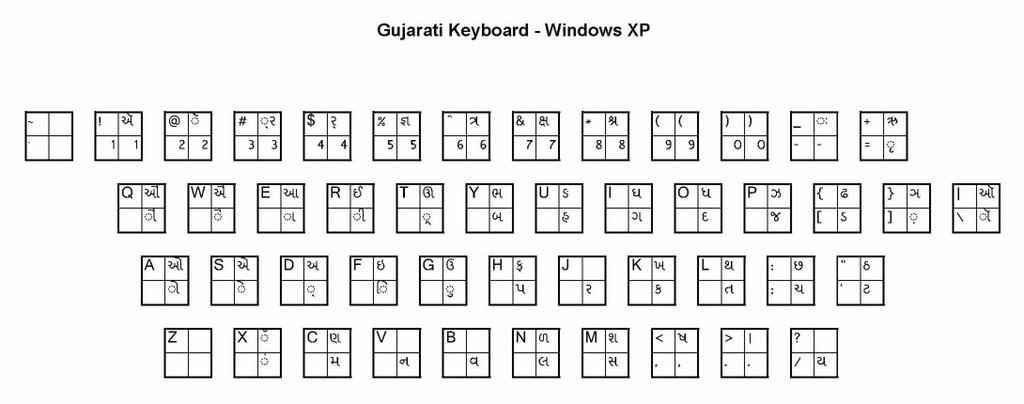
The keyboard layout makes all the letters of the alphabet available for typing. For instance, the Gujarati keyboard layout is shown at the top of this article.

It is very easy to combine characters. For example, to create the Gujarati combination નિ, you type the letter ન, followed by the symbol 'િ'. The combination મો would be મ followed by 'ો'.

Conjunct consonants require you to use '્', called the “virama” key in Unicode. For example, the Gujarati ધ્ય is produced by typing ધ, the virama '્', then ય. The one letter word હ્યું is five keystrokes: the letter હ, then the virama '્', followed by the ય, 'ુ' and 'ં' symbols.

Some character combinations are not obvious by looking at the keyboard layout. For the Gujarati language, here is a list of the most commonly used conjunct consonants.


ShrutiArial Unicode MSShrutiArial Unicode MS
ભ્રભ્-રભ્રભ્-રરૂર-ૂરૂર-ૂ
હૃહ-ૃહૃહ-ૃર્બર્-બર્બર્-બ
હ્યહ્-યહ્યહ્-યર્ગર્-ગર્ગર્-ગ
ગ્રગ્-રગ્રગ્-રર્દર્-દર્દર્-દ
ગ્નગ્-નગ્નગ્-નર્પર્-પર્પર્-પ
ઘ્યઘ્-યઘ્યઘ્-યર્થર્-થર્થર્-થ
દ્બદ્-બદ્બદ્-બર્મર્-મર્મર્-મ
દ્ભદ્-ભદ્ભદ્-ભર્વર્-વર્વર્-વ
દ્ગદ્-ગદ્ગદ્-ગર્યર્-યર્યર્-ય
દ્ઘદ્-ઘદ્ઘદ્-ઘક્રક્-રક્રક્-ર
દ્દદ્-દદ્દદ્-દખ્રખ્-રખ્રખ્-ર
દ્ધદ્-ધદ્ધદ્-ધત્તત્-તત્તત્-ત
દ્રદ્-રદ્રદ્-રછ્વછ્-વછ્વછ્-વ
દ્મદ્-મદ્મદ્-મમ્રમ્-રમ્રમ્-ર
દ્નદ્-નદ્નદ્-નન્નન્-નન્નન્-ન
દ્વદ્-વદ્વદ્-વસ્ત્રસ્-ત્રસ્ત્રસ્-ત્ર
દ્યદ્-યદ્યદ્-યસ્રસ્-પસ્રસ્-પ
ધ્યધ્-યધ્યધ્-યરુર-ુરુર-ુ
જીજ-ીજીજ-ીશ્ચશ્-ચશ્ચશ્-ચ
પ્રપ્-રપ્રપ્-રશ્વશ્-વશ્વશ્-વ


You will notice that the Arial Unicode MS font does not display all the symbols in the same way – in some cases it displays the virama instead of the conjunct consonant. However, the virama is recognized by most native language readers.

If you see '?' (question marks) or ્ (square) characters in this article, it means that you do not have the Arial Unicode MS and Shruti fonts loaded on your system. The Arial Unicode MS font is not a free download (see http://lists.webjunction.org/wjlists/web4lib/2002-August/020299.html). It is bundled with Office XP/Word 2002 and Office 2003/Word 2003. To install it, see http://support.microsoft.com/kb/q287247/. If you not have these products, you can purchase the Arial Unicode MS font for $20 from http://www.myfonts.com/fonts/microsoft/arial/. The Shruti.ttf font is bundled with Windows XP and Windows Server 2003. For other versions of Windows, you can download it for free from http://www.readgujarati.com/readinghelp.asp.

Numbers.

The keyboard layout allows you to enter Western style numerals, 0 through 9. If you wish to type the number Indian-language style, open up the Windows Character Map utility by clicking on Start, then All Programs, Accessories, System Tools, and Character Map. Select the Indian font that you will be using (see the list of fonts by language above). For example, choose Shruti if you are typing in Gujarati. You can then click on all the Indian-style numerals that you want, and then click on Copy. Switch back to your Word document, click on the Edit menu, then Paste Special, and Unformatted Unicode Text. The Gujarati-style numerals look like this:
૦ ૧ ૨ ૩ ૪ ૫ ૬ ૭ ૮ ૯.

Spell checking.

When a possible misspelling is detected, it will be underlined with a wavy red line. To get a list of possible corrections, simply right click on the misspelled word. You will get a pop-up list of many different words to choose from! This is available for Hindi, Gujarati, Kannada, Marathi, Punjabi, Tamil, and Telugu.

Producing web pages.

Of course, you could save a Microsoft Word document as an HTML file. However, you will see the typical mess of Microsoft tags, a black hole to any professional HTML developer. Also, Unicode data is better handled by XHTML rather than HTML.

So, if you are a serious web page designer, and you want to produce clean XHTML files from your Word documents, here’s one way to do this (this was written in 2003):

a) Use Microsoft Word 2002 – makes it easy to enter text and do spell checking. Copy, then
b) Use Wordpad – Paste, and right away Copy
c) Use Microsoft Frontpage 2002 – create a blank HTML file, switch from Normal to HTML view, then replace all the Frontpage-style code with the following basic set of XHTML tags:

<!DOCTYPE HTML PUBLIC "-//W3C//DTD HTML 4.01 Transitional//EN">
<html><head>
<title></title>
<meta http-equiv="Content-Type" content="text/html; charset=utf-8">
<link href="chars-descn.css" rel="stylesheet" type="text/css">
</head>
<body>
<SPAN class=gu>
Gujarati text gets pasted here
</SPAN>
</body>
</html>

The chars-descn.css file here is a Cascading Style Sheet. It would include a section that defines the “gu” style like this:

SPAN.gu {
FONT-SIZE: 1.25em; FONT-FAMILY: shruti, "arial unicode ms", sans-serif
}

Notice that it calls for the Shruti font if available, otherwise the Arial Unicode MS font. This will cover all Windows XP and Windows 2000 computers.

Now paste the Gujarati text that you had in WordPad into position between the tags, and Save your XHTML document. The XHTML tags will trick FrontPage into not converting the Gujarati text into a series of unrecognizable special characters. Otherwise અમેરિકા would become &#2693;&#2734;&#2759;&#2736;&#2751;&#2709;&#2750; !

d) Use Dreamweaver MX – You can now open up the XHTML file you created in FrontPage, format it just the way you want to, and still be able to read the Indian text when you view the HTML Code.

Conclusion.

Microsoft has finally recognized that there are a billion people in India. Many thanks to the Indian language experts and software developers that they paid to do this. And if Microsoft lowers the price on their software, they will truly achieve monumental success in India.